Skip to content

MANAGED COMMUNITIES & COHORTS

Expert knowledge that spreads. Expert time that’s protected.

Built with your team. Run by your team. We help you set up a Knowledge Station for recording expert explanations and a community where people discuss and practice what they learn. Over 90 days, we train your staff and run both alongside them, preparing your team to take over.

  • Today: The same question, over and over.With your Expert Lab: Answer once. Everyone finds it.
  • Today: Crucial issues buried in DMs.With your Expert Lab: They reach your experts, with context.
01 - How it worksProven community habits

Borrow what makes the best communities work.

Merchants, pilots, automation practitioners and peer supporters solve problems together every day in public communities like these. The habits behind them carry over to any field where know-how sits with a few busy experts.

  • Screenshot of the Shopify Community forum
    Shopify CommunityMerchants
  • Screenshot of the let's talk forum
    let's talkPeer support
  • Screenshot of the Infinite Flight forum
    Infinite FlightPilots and players
  • Screenshot of the UiPath Forum forum
    UiPath ForumAutomation practitioners
  • Screenshot of the MongoDB Community Hub forum
    MongoDB Community HubDevelopers
  • Screenshot of the TrustedHousesitters forum
    TrustedHousesittersMembers
  • Screenshot of the Niantic Wayfarer forum
    Niantic WayfarerContributors
  • Screenshot of the YoYoExpert Forums forum
    YoYoExpert ForumsHobbyists
  • Screenshot of the Asana Community forum
    Asana CommunityCustomers
  • Screenshot of the Katalon Community forum
    Katalon CommunityQA professionals
  • Screenshot of the HomeExchange forum
    HomeExchangeTravelling members
  • Screenshot of the Make Community forum
    Make CommunityBuilders
  • Screenshot of the Wyze Community forum
    Wyze CommunityCustomers
  • Screenshot of the Unreal Engine Forum forum
    Unreal Engine ForumGame developers
  • Screenshot of the NVIDIA Developer Forums forum
    NVIDIA Developer ForumsEngineers
  • Screenshot of the Cursor Forum forum
    Cursor ForumDevelopers
What makes them workIn your Expert Lab
Answers stay findable
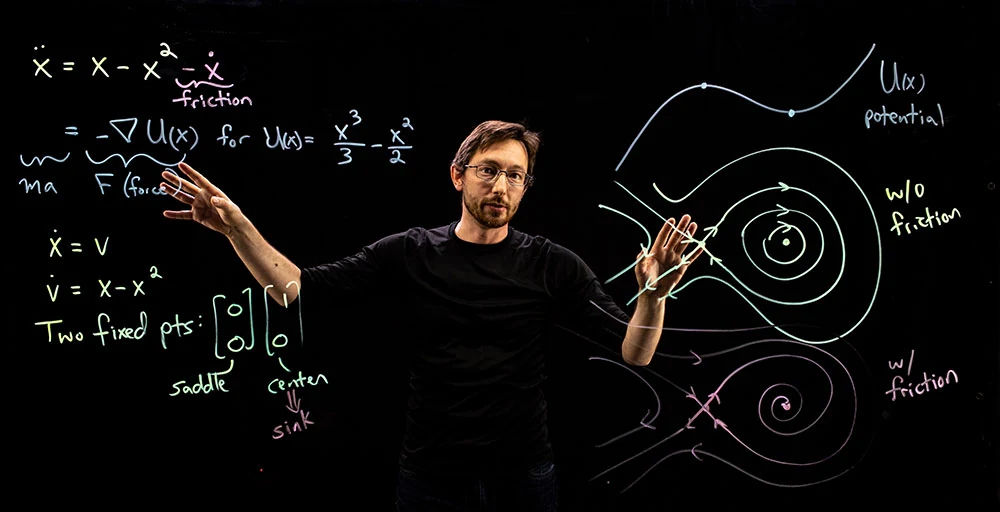
Answer once. Everyone finds it.Recorded explanationsAn expert explains a recurring problem once, at the lightboard, and the next person who asks finds the answer instead of interrupting them.
Peers answer each other
Answer once. Everyone finds it.Practitioner discussionMembers ask, compare approaches and report what happened in their own work, so experts are not the only ones answering.
Someone notices what keeps coming up
Crucial issues reach your experts, with context.Your team surfaces the crucial topicsYour staff practice tracking recurring questions and bringing experts the ones that need their judgment, with context gathered and DBX guidance during launch.
Fixes are reviewed before they spread
Authorized trials and peer reviewNew methods are tried within agreed limits, then reviewed by peers before other teams adopt them.
Someone keeps it current
Practices with owners and review datesWhat holds up is kept with its reasoning and limits, and checked again when tools, policy or conditions change.
Contributors get credit
Recognized expertsThe people others learn from are named, credited and given time to contribute.

Built-in AI, on your terms

The community does the finding. Your experts keep the judgment.

A dedicated Discourse community brings its own AI. It works from what your experts have already explained, and the community stays useful with it switched off.

Finds the answer

Semantic search and related topics surface the expert's explanation when someone asks in their own words. An assistant can answer from your community's reviewed content and documents, with the source linked.

Protects your team’s time

Summaries catch people up on long discussions. Spam and toxic content are caught automatically. Usage and cost reports show what the AI is actually doing.

Runs where you decide

Discourse's managed hosting with its included open-weights model, your approved cloud AI provider, or your own servers with a locally run model. AI data stays with your community content.

02 - Example · AI adoptionIllustrative example

Give your AI rollout a feedback loop.

People learn where AI helps, where it needs checking and where it should not be used by trying it in their own work. Here is how one finding moves through the community.

Illustrative scenario · Not a client result

The AI draft looks finished. The handover still misses the exception.

Step 1 of 6 · Teams / Slack → community

Surface the problem

“Can we use AI to draft handovers without losing the details the next team needs?” A question in the daily channel opens a focused community discussion.

The client's community team, supported by DBX during launch, invites enthusiastic users, people who stopped, and nonusers. They gather approved or redacted examples, reasons for using or avoiding the tool, and unanswered questions - not just the most confident voices.

Client community team: include quieter voices, follow unanswered questions and moderate respectful challenge. DBX: coach the routine during launch.

Possible status at this illustrative stage

  • Proposed (illustrative stage)
  • Trying
  • Reviewed
  • Approved
  • Reused

A question to investigate, not evidence that AI improves the work.

Practice record Illustrative · evidence to collect
Question
Can AI help draft handovers without losing the details the next team needs?
Context
Illustrative cross-team handovers; approved tool and non-sensitive sample material only.
Previous approach
For the trial baseline, document the existing handover and review process before changing it.
Proposed change
Draft from approved sources; check each claim and exception against its source before handover.
Evidence to collect
Reviewed draft/source pairs, omissions, handover quality, drafting time, checking/correction time and a second team's reuse attempt.
Limitations
Sample work only. Preserve failures and exceptions. No inference of production readiness or company-wide adoption.
Reviewer role
Client domain expert and receiving-team peer.
Owner role
Client workflow owner; sponsor and IT own relevant access, tool and policy decisions.
Review timing
Proposed: agree before the trial; revisit after the trial, peer review and the second-team attempt, and whenever the approved AI tool, policy or workflow changes.
Status
Proposed - possible illustrative status only. A question to investigate, not evidence that AI improves the work.
03 - What you getPeople, Station, community

Tools don’t make a community useful. People do.

Your Station captures explanations. Your community puts them into practice. During launch, DBX helps your staff learn to run both together, with expert approvals and time set aside for the work.

An instructor draws on an illuminated lightboard while a nearby monitor displays the recorded explanation.
A team ready to take over
DBX guides and works alongside your staff during launch. They practice the day-to-day routine, including routing expert questions, then take over with trained roles, an operating guide and reusable templates. We agree the scope and staff time with you.
A Knowledge Station
An illuminated writing board with built-in camera and light, where experts explain work while drawing. We set it up and train your staff. Learning-design support turns explanations into captions, a written companion, discussion prompts and application exercises.
A Community of Practice
A group learning together around shared work. Your staff practice running it with DBX; software alone does not make it work. Approved policies stay in your systems.
Members can ask questions, share what they try and find reviewed answers, without everyone having to meet at once.
Station sizes and setup

35-inch model

Width with legs
39.39 in
Leg footprint depth
11.02 in
Assembly height
22.01-25.95 in
Camera arm
19.33 in

50-inch model

Width with legs
52.47 in
Leg footprint depth
11.02 in
Assembly height
29.37-33.31 in
Camera arm
27.11 in

Published eGlass dimensions, not the full working footprint: the presenter, computer and camera arm need room around the station. You provide a compatible, IT-approved computer and suitable space.

eGlass specifications
Denis Bundi

Who guides your launch

Denis Bundi

Founder and CEO · Seattle

Denis brings experience in software engineering, instructional design and learning-platform development. He leads your launch with the DBX team.

Denis on LinkedIn
04 - 90-day launchFor organizations

Launch your Expert Lab in 90 days.

A fixed-scope rollout, not a subscription. Your staff learn to run the Station and community alongside DBX, then take over with a practiced routine. You provide an internal owner, participating experts and agreed staff time.

Every package includes

  • Setup and staff trainingDBX guides your team as you set up the Station and community and practice running them together.
  • Learning-design supportShape explanations and exercises with your experts, who retain approval.
  • A practiced handoverAn operating guide, reusable templates and trained staff roles for your day-to-day routine. Optional ongoing DBX support is quoted separately.
A presenter writes on a 35-inch eGlass lightboard set on a desk.
35-inch · Desktop

Foundation

Prove the model around one recurring problem.

$15,00090-day launch fee

Practices
One
Initial members
Up to 30
Facilitated reviews
4
Idea launches
2
Complete Lightboard explanations
1
Knowledge Station in the fee
One 35-inch desktop Knowledge Station
Client-controlled deployment
Not included
A 50-inch eGlass lightboard on A-frame legs, with a camera arm extending in front of the glass.
50-inch · Mounting agreed

Enterprise launch

Coordinate related practices across a broader organization.

$35,00090-day launch fee

Practices
Up to 3
Initial members
Up to 150
Facilitated reviews
8
Idea launches
4
Complete Lightboard explanations
3
Knowledge Station in the fee
One 50-inch Knowledge Station, mounting agreed for your space
Client-controlled deployment
Scoped

Station images: eGlass. Shown for reference - final configuration is confirmed in your written proposal.

  1. Days 1-30

    Set up the Station and community. Train the team, agree staff roles and welcome the first members.

  2. Days 31-60

    Record explanations and run practice and discussion together. Experts review answers; owners authorize trials.

  3. Days 61-90

    Client staff rehearse running the Station and community with DBX support, review the work and take over with the operating guide and templates.

Good to know

Launch fee: Covers the 90-day launch and supported handover. Time, production, platform and client responsibilities are agreed in writing.

  • Your team provides: An internal owner, participating experts with protected time, agreed staff time, named decision owners, a compatible computer and suitable space.
  • Separate scope: Ongoing DBX support is optional and quoted separately. Hosting, infrastructure, licenses, AI usage, local compute, technical operations and custom integrations remain separately scoped unless included in your agreement. Complex infrastructure is additional scope.
  • Proposal details: One station at one client site. Final equipment configuration, delivery charges, tax and any on-site work are confirmed in your written proposal. Unspecified travel and room works are not included.
Plan your Expert Lab
05 - Your own practiceFor independent experts

Running your own practice?

Turn what you know into a cohort course or practice community that builds your standing with the people you want to serve.

Also from DBX: learning delivery and Lightboard Studio recording days.

06 - QuestionsPlainly answered

Questions buyers ask first.

What is a managed community of practice?

A group that learns together around shared work: asking questions, trying methods and reviewing what happens. DBX helps your staff establish and practice that routine during launch, then take over. Your owners decide what changes. Software alone does not create a functioning community.

How much does an Expert Lab cost?

Fixed 90-day launch fees are Foundation $15,000 (one practice, up to 30 initial members), Growth $25,000 (two related practices, up to 75 initial members) and Enterprise launch $35,000 (up to 3 practices, up to 150 initial members). Each includes one Knowledge Station at one client site, staff training, learning-design support, shared operation with DBX and supported handover. Ongoing DBX support is optional and quoted separately. Hosting, licenses, technical operations and infrastructure are separately scoped. Independent course design starts at a $750 course base plus $225-$1,125 per lesson.

How is a community of practice different from training or an online community?

Training follows a curriculum; an online community provides a place to talk. A community of practice adds a recurring cycle: try methods at work, compare results and improve together. An Expert Lab supports that cycle with recorded explanations, discussion and authorized trials with peer review. Practices have named owners and review dates.

How long does it take to launch a community of practice?

90 days: set up and train in days 1-30, record and practice together in days 31-60, then rehearse client-led operation and take over in days 61-90. Handover is the expected path, within the agreed scope and staff availability.

Can our team run this after the 90-day rollout?

Yes - that is the design goal. With DBX support, staff practice recording, welcoming members, guiding discussion, routing expert questions, maintaining reviewed answers and checking progress. You receive an operating guide, reusable templates and trained staff roles. You provide an internal owner, participating experts and staff time. We agree the staff roles, weekly time and handover scope before launch. Ongoing DBX support is optional and quoted separately; hosting and technical operations remain separately scoped.

Why pay for this when we already have Microsoft or Slack?

You pay for setup, staff training, learning design and supported handover, not just software. DBX guides and shares the work during launch. We use your existing tools where they fit; Discourse is recommended only when lasting discussion, deployment control, portability or ownership justify it.

Where does the community run?

In your existing tools, on managed Discourse hosting, or on your own infrastructure, on premises or in a private cloud, within an agreed scope. Hosting and technical operations are separate from day-to-day community operation. We agree identity, access, retention and processing boundaries for AI, email, analytics and backups with your IT team.

Do we have to use AI?

No. AI is optional, permissioned and reviewed; the community is designed to be valuable with it switched off. Dedicated Discourse communities include AI capabilities for search, summaries, reviewed-content answers, moderation and usage reporting. Discourse's included hosted model comes only with its hosting plans. Self-hosted communities use approved cloud AI, which processes selected content with that provider, or separately scoped and validated local AI. Stored AI data stays alongside community content; processing boundaries are agreed with IT.

What if we already have a thriving community?

Keep what is working. We target agreed gaps, such as expert workload, learning design, cross-team reuse or maintained practice, rather than replacing a healthy community.

How will we know it is working?

We record a baseline at the start, then look for reuse beyond the originating team, quality of methods, changes in expert effort and value to members. No posting quotas, and no outcome is guaranteed.

What is included with the Knowledge Station?

The package's selected eGlass lightboard with built-in camera and lighting, agreed mounting, setup and operator onboarding at one client site. You provide a compatible, IT-approved computer and suitable space; if you already have recording equipment, we reuse what is suitable. Foundation includes one complete explanation, Growth two and Enterprise launch three, with lengths and revisions agreed in the proposal. Delivery charges, tax, audio, cabling and any on-site work are confirmed there too. Unspecified travel and room works are not included.

Plan your Expert Lab

Bring us the questions people keep asking you.

In your summary, tell us:

  1. The questions or problems that keep coming back to you or your experts.
  2. Who needs the answers: your teams, your clients or your audience.
  3. Where they already gather, such as Teams, Slack or an existing community.

DBX Expert Lab
Denis Bundi, Member-Manager & CEO
Seattle-based · Working nationally
denis@dbxai.com
206-880-2045

Where does your expertise live?

Working independently? Enter your practice name or your own name.

What happens next

DBX reviews your initiative. We’ll clarify the audience and challenge, then discuss whether DBX is the right fit for a scoped next step. A brief description is enough to start.

Prefer email? Contact denis@dbxai.com directly.

How we use your information

DBX saves the details you submit to review your initiative, respond, and follow up. We also record the DBX page you came from and the progress of the conversation to understand which inquiries are a good fit. Submitting does not sign you up for a newsletter.

Please do not include confidential client or personal information in your description. For questions about your submitted information, or to request its deletion, email denis@dbxai.com.